Case · Project landing page IPM Climate Hub Ukraine

An educational landing page for IPM Climate Hub Ukraine

Resources on plant protection in a changing climate, plus a form to ask a practising scientist. A distinct design and control panel for the PROGRESS project.

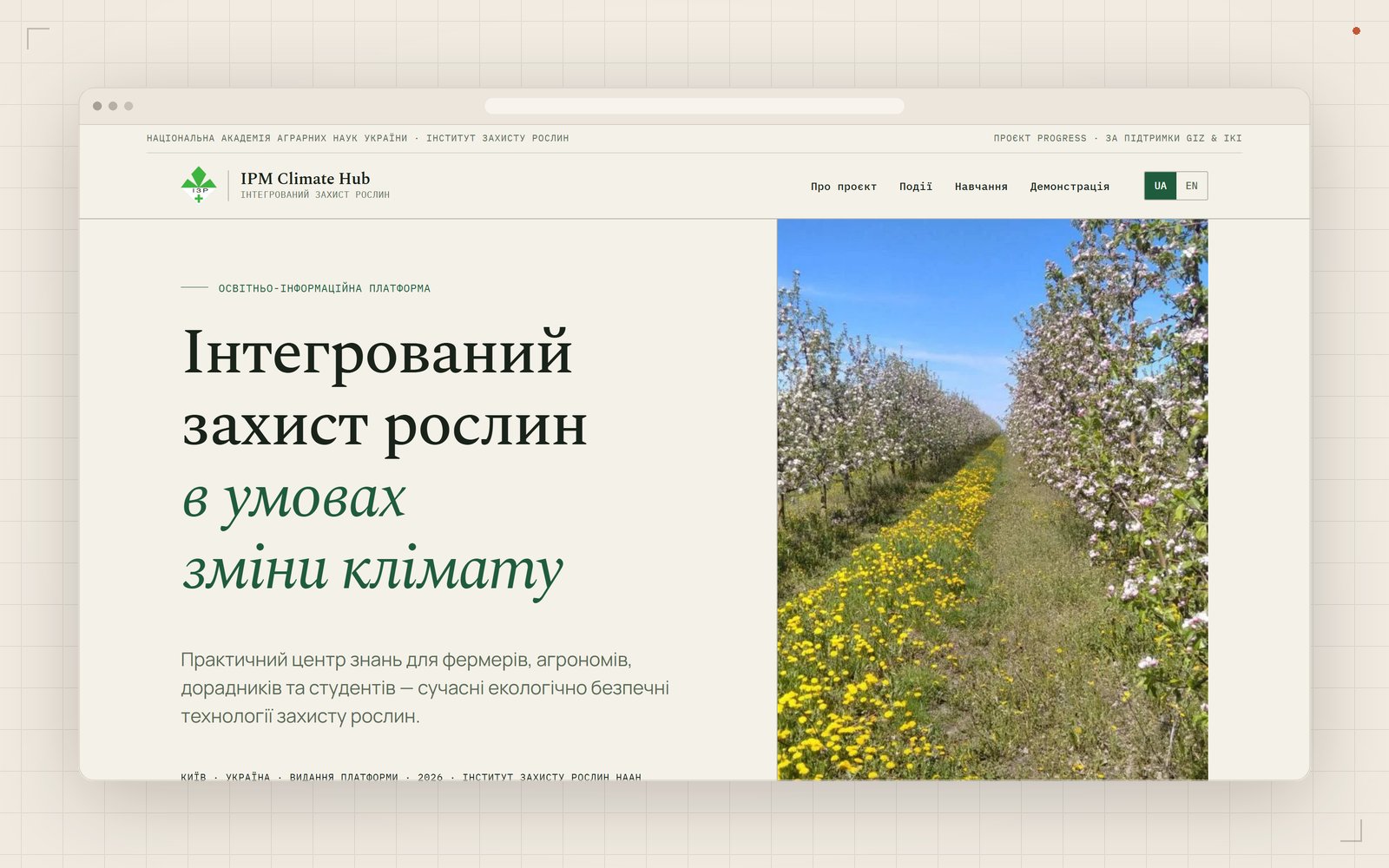
IPM Climate Hub Ukraine: Hero section
01

About the project

IPM Climate Hub Ukraine is an educational page about integrated plant protection in a changing climate. We built the landing page for farmer education within PROGRESS. Its design, fonts, colours and menus are separate from the institute website. One page brings together 16 booklets, 13 presentations, climate risk information and a garden strawberry demonstration plot for the 2026 season. Visitors can view resources on the page and download them for later reading. An editor maintains events selected from institute news. Farmers can ask a practising scientist a question and attach a plant photo. New enquiries are marked in the control panel. The team has its own panel with nine sections for resources, menus and page blocks, which can be enabled or disabled. The page supports two languages; English text is filled through a translation button and checked by an editor. It is published on the institute domain, with a move to a dedicated subdomain supported through settings. A QR code was prepared for printed resources.

The client is the Institute of Plant Protection NAAS in Kyiv. The page was created for farmer education within PROGRESS, supported by the German Government through GIZ and IKI. The landing page was published alongside the institute website as a separate product with its own brand and panel.

02

The task

IPM Climate Hub Ukraine needed a distinct brand alongside the institute website. Booklets, presentations and climate risk information had to be convenient for farmers to use. Resources needed to open on the page and be downloadable. The project team needed its own tools to manage this content.

Another task was to accept questions for a scientist with plant photos and show new enquiries to the team. The page needed to support two language versions and allow blocks to be enabled or disabled. A move to a separate address had to be planned from the start, without rebuilding the landing page later.

03

Project in numbers

16Booklets
13Presentations
10Events
9Panel sections
04

What we built

A distinct design

The landing page has its own colours, fonts, menu and visual design. They distinguish IPM Climate Hub Ukraine from the institute website. Resources and the consultation form are brought together on one page. Farmers can browse the sections within the project’s own visual identity.
1 / 8

A distinct design

The landing page has its own colours, fonts, menu and visual design. They distinguish IPM Climate Hub Ukraine from the institute website. Resources and the consultation form are brought together on one page. Farmers can browse the sections within the project’s own visual identity.

Booklets and presentations

The page contains 16 booklets and 13 presentations. Resources open in an embedded viewer and can be downloaded. Farmers can examine a resource before saving it. Editors manage booklets and presentations in the panel.

Climate risks and demonstration plot

Separate sections cover climate risks and the demonstration plot. The plot features garden strawberries for the 2026 season. This information sits alongside educational plant protection resources. Farmers can read about the project and its demonstration plot on the same page.

Project events

The events section contains a selection of 10 items from institute news. An editor selects and maintains this project collection. Events are drawn from institute news, so editors do not have to enter the same content twice. Visitors can read relevant project items on the landing page.

Ask a scientist and attach a photo

Farmers describe their problem in the form for a practising scientist. They can attach a plant photo to show its condition. Submissions reach the panel marked as new. The page states the response time: 2–3 working days.

A dedicated control panel

The project has a dedicated panel with 9 sections. The team manages settings, page sections, menus, resources, events and consultations there. Page blocks can be enabled or disabled. Editors can change the landing page layout independently of the institute website.

Two languages and translation

The page supports Ukrainian and English versions. Editors write in Ukrainian, press Translate and check the resulting English fields before publication. Formatting and links are preserved; the button is on 24 screens across both panels, and empty translations have a warning. Bulk translation with a preview is available for migrated material and was used for the institute website.

A separate address and a QR code for print

Moving to a dedicated subdomain is supported through a setting change. The team does not need to rebuild the page for this move. A QR code for the page was prepared in four formats for printed resources. Readers can scan it on a booklet to open the landing page with resources and consultation.

05

How we worked

1

Client contract

The contract was signed in July 2026. A report was published in Prozorro as a direct purchase without a tender.

2

Design and page layout

We created a distinct design and built the landing page layout. Colours, fonts and menus differ from the institute site.

3

Resources and content tools

We added booklets, presentations, events and the consultation form. The team received a dedicated panel for sections and resources.

4

Publication on the institute domain

The page was published on the institute domain. A move to a dedicated subdomain remains available through settings.

06

Gallery

Select an image to enlarge it.

07

Tech stack

Backend

Laravel · Blade · SQLite

Control panel

Filament v5 · 9 sections

Images

Automatic compression and WebP delivery.

Hosting

The client’s PHP hosting, without Node on the server.

08

Outcome

The client received a dedicated educational landing page with booklets, presentations, events and a consultation form. It is published on the institute domain. Farmers can view and download resources and submit questions with plant photos.

The team maintains the page in its own panel, updating resources, selecting events and changing page blocks. Editors can use the translation button to fill in the English fields and check the text before publication. A move to a dedicated subdomain is supported through settings, and a QR code for the page is ready for print.

Related case: the Institute of Plant Protection NAAS website

09

Frequently asked questions

This project includes an introduction, booklets, presentations, climate risks, a demonstration plot, events and consultations on one page.

The page provides a form to describe the problem and attach a plant photo. Submissions reach the panel; the page states a response within 2–3 working days.

Yes. A dedicated panel lets the team maintain booklets, presentations, events, menus and page sections. Blocks can be enabled or disabled.

Yes. This project supports moving to its own subdomain through a setting change without rebuilding the page.

Yes. For the PROGRESS landing page, the contract with the institute was signed in July 2026. The report was published in Prozorro, Ukraine’s public procurement system, as a direct purchase without a tender.

Editors write in Ukrainian and press Translate to populate English fields automatically. For example, a manager creates a news item and receives its English text after pressing the button. Formatting is preserved and links remain unchanged. Before publication, editors check and amend the translation; empty fields have a warning.

Website development

Need a landing page for an educational project?

Tell us about your content, structure and editorial work. We can discuss what your website needs.

All cases
— Also

Other services

Cost calculator →
— Journal · insights

From our blog

All articles →
Call+38 095 108 62 12 +38 097 599 66 89 Telegram Viber WhatsApp